


文本加密、共享与解密指南
AxCrypt lets you encrypt plain text in seconds. Simply enter the text, secure it with your account password or a custom password, and share the encrypted output via email, private messages, and more.

桌面上的文本加密
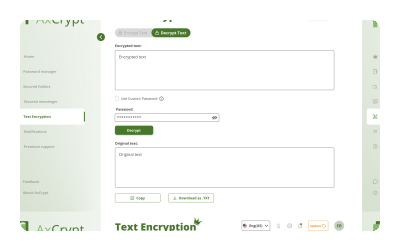
在桌面上打开AxCrypt应用。
在菜单中选择 文本加密。
点击 加密文本。
请在下方输入栏输入您的文本(最多1000字符)。
Click Encrypt
您的加密文本将生成并在下方显示。
注: 你可以选择一个强且易于记忆的自定义密码,用于加密和解密这些文本。
桌面版解密文本
在桌面上打开AxCrypt应用。
在菜单中选择 文本解密。
点击 解密文本。
请在下方输入栏输入您的加密文本。
点击 解密
您的加密文本将被解密,原始文本将显示在下方。
Important Notes:
If the encrypted text was shared using the Anyone option, you must enter the custom password provided by the sender to decrypt the content.
If the text was shared with you as a Specific user, no password is required, you can decrypt the content directly using the secure link.
通过我们的教程加快速度!

快速 提示
🔐 保护密码安全: 只与目标接收者分享,避免通过不安全的渠道发送。
📝 再次核对文本: 加密前确保输入准确,因为加密文本无法编辑。
🛡️ 自定义密码:安全 存储密码(推荐使用密码管理器)。AxCrypt无法帮你恢复或重置密码,因为我们从未获得你的密码访问权限。
常见问题
加密文本有字符限制吗?

加密文本需要密码吗?
我该如何分享加密文本?
加密文本通过电子邮件或聊天应用发送安全吗?
我可以编辑加密文本吗?
AxCrypt 中用于文本加密的加密算法是什么?
文本加密是在我的设备上本地进行,还是在云端进行?
如果我忘记密码怎么办?