


Text Encryption, Sharing and Decryption Guide
AxCrypt lets you encrypt plain text in seconds. Simply enter the text, secure it with your account password or a custom password, and share the encrypted output via email, private messages, and more.

Encrypting Text on Desktop
Open the AxCrypt App on your Desktop.
From the menu, select Text Encryption.
Click Encrypt Text.
Enter your text in the input field below (up to 1000 characters).
Click Encrypt
Your encrypted text will be generated and displayed below.
Note: You can opt for a custom password that is strong & easy to remember, to encrypt & decrypt this text.
Decrypting Text on Desktop
Open the AxCrypt App on your Desktop.
From the menu, select Text Decryption.
Click Decrypt Text.
Enter your Encrypted text in the input field below.
Click Decrypt
Your encrypted text will be decrypted, and the original text will be displayed below.
Important Notes:
If the encrypted text was shared using the Anyone option, you must enter the custom password provided by the sender to decrypt the content.
If the text was shared with you as a Specific user, no password is required, you can decrypt the content directly using the secure link.
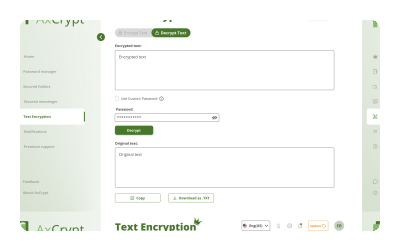

Move faster with our tutorials!

Quick Tips
🔐 Keep your password secure: Share it only with intended recipients and avoid sending it through insecure channels.
📝 Double-check your text: Ensure your input is accurate before encrypting, since encrypted text cannot be edited.
🛡️ Custom Password: Store your password safely (password manager recommended). AxCrypt cannot recover or reset it for you, as we never have access to your password.
FAQ
Is there a character limit for encrypting text?

Do I need a password to encrypt text?
How do I share the encrypted text?
Is the encrypted text safe to send over email or chat apps?
Can I edit encrypted text?
Which encryption algorithm is used for text encryption in AxCrypt?
Does text encryption happen locally on my device or on the cloud?
What happens if I forget my password?